
Key Takeaways
- Match graphic design tools to your goal.
- Use AI to work smarter. AI tools simplify visual creation, editing and brainstorming.
- Combine strong visuals with effective SEO and marketing strategies to drive success.
What Is an Online Graphic Design Platform?
An online graphic design platform is a web-based application that lets users create visual content such as social media and marketing graphics, presentations and logos, directly in their web browser.
How Online Graphic Design Platforms Work
Powered by a cloud-based engine, an online graphic design tool uses drag-and-drop components and a prebuilt library so users can produce creatives without installing heavy software.
Who Can Use Free Graphic Design Platforms?
Free online graphic design apps are ideal for beginners and students, social media designers, and small business owners.
7 Best Free Online Graphic Design Platforms in 2027
There are several free graphic design platforms available online. We have curated a list for users to identify which one is best suited for them.
1. Canva
Canva is a popular online graphic design tool offering freemium options. Its free tier includes thousands of templates and stock photos. The app also features AI tools like Magic Write and background remover, helping beginners, students, and creators design clean graphics with ease.
Canva scaled rapidly over the past year, with over 260 million monthly users, making it the go-to choice for beginners and enterprises.
2. Adobe Express
Powered by Adobe technology, Adobe Express is an intuitive social media graphic design software featuring image editing, background removals, filters, and video tools. The platform is ideal for beginners, non-designers, social media managers and content creators looking to quickly create social media creatives, slideshows, and marketing materials.
3. Figma
Figma is a powerful online graphic design platform commonly built for UI/UX designers, product teams, and developers to create website layouts, vector illustrations, and mobile app screens directly in the web browser. Its free tier offers vector editing, unlimited cloud storage, and real-time collaboration, alongside a rich library of plugins and templates. .
4. Adobe Creative Cloud
Adobe Creative Cloud offers access to entry-level cloud based apps and web services on signing up for a free Adobe ID. The platform is ideal for beginners & students, and hobbyists looking to explore photo editing, digital design, and illustration without committing to a full subscription.
5. ChatGPT
While primarily a conversational AI assistant, ChatGPT is used by 100 million users in India weekly for copywriting and design ideation.
This indicates that ChatGPT also functions as an invaluable text-based tool for graphic designers and marketers. It is ideal for content creators, copywriters, and entrepreneurs brainstorming visual concepts. Its main benefits include quick generation of creatives, layout copy, design prompts.
6. Snappa
Snappa is a simple online graphic design platform built specifically for quick content creation. It is ideal for busy bloggers, marketers, and small business owners who need graphics fast. Its main advantages include pre-sized templates for every major social network, and zero-learning-curve drag-and-drop editor.
7. VistaCreate
VistaCreate (formerly Crello) is a graphic design platform heavily focused on marketing and social content. It is ideal for social media managers, entrepreneurs, and small business creators. Its main pros include thousands of static and animated templates, a built-in brand kit, and easy resizing tools for multi-platform campaigns.
How to Choose the Right Free Graphic Design Platform
The best free design app depends on your experience, requirements and the features you need. Whether you’re looking for a free graphics creator software for beginners or a specialized tool for marketing campaigns, these categories can help you find the right fit.
For Beginners
Look for easy-to-use interfaces and ready-made templates that help you create designs without prior experience.
Examples: Canva, and Snappa offer drag-and-drop editors and extensive template libraries making them some of the best apps to create graphics with ease. ChatGPT can also help generate visuals using descriptive prompts.
For Social Media Marketing
Look for ready-sized templates and tools that make resizing designs easy. A good social media post maker app should help you create content for different platforms quickly.
Examples: Adobe Express and VistaCreate offer templates for major social networks and simple editing tools. Both are useful for social media design tools.
For Professional Graphic Design
Professionals need advanced editing tools, precise controls, and vector creation features to create detailed graphics. .
Examples: Adobe Creative Cloud includes tools such as Photoshop and Illustrator, while Figma supports vector editing in the browser. Consider these options when exploring tools for graphics.
For AI-Assisted Design
Choose platforms with AI features such as text-to-image generation, layout suggestions, and automatic editing. These tools can help speed up the design process.
Examples: ChatGPT can generate visuals from prompts, while Canva and Adobe Express offer AI-powered design features, Check features available on their free plans.
For Team Collaboration
Choose platforms that support real-time editing, shared workspaces, comments and easy file sharing. These features help teams work together on designs.
Examples: Figma supports collaborative design, while Canva offers shared folders and team features. Both can work as a social media design tool for teams creating content together.
For Branding and Marketing
Look for brand kits, reusable templates, custom fonts, and colour palettes. These features help keep your brand’s look consistent across marketing campaigns.
Examples: VistaCreate and Canva both include built-in brand kits to help businesses maintain a visual identity. Check their free-plan limits before choosing a platform.
Free vs Paid Graphic Design Platforms
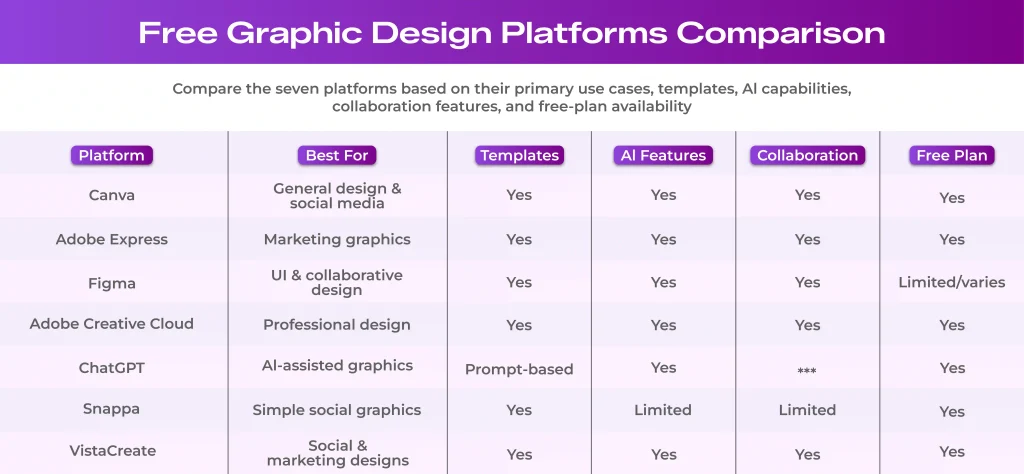
Free design plans offer useful tools for beginners and casual creators, while paid plans work best for experienced professionals looking for more templates, advanced features and greater flexibility. When comparing design apps, consider how their free and paid features match your needs. The following table highlights the key differences to look for when choosing the best apps for making graphics.
When choosing an application for graphic design, check the specific features included in each plan, as limits vary across platforms. This is especially important if you’re comparing social media graphic design software or social media post design apps, where access to templates, resizing tools and brand features can affect your workflow.
Graphic Design Platforms for Different Use Cases
Design tools are gaining prominence on a national and global scale. Adobe is planning to provide Adobe Express access to 7.8 million students and teachers in the country.
Depending on their needs, users can apply these tools for various creative purposes.
Social Media Post Design
Social media content needs to fit different platforms, formats, and audience preferences. Social media marketing teams opt for Adobe express or VistaCreate to create posts for Instagram, LinkedIn, and Facebook.
These graphic design platforms offer preset dimensions and ready-made templates that simplify content creation, enabling bulk post creation and scheduling convenience.
Brand and Marketing Graphics
In branding and digital marketing, experienced designers adhere to colour palettes, typography, and reusable asset libraries to create brand consistency across client campaigns. Canva custom design app that provides brand kits and reusable team templates making it easier to create visual consistency.
Teams can also explore AI in branding and marketing to understand how AI-powered tools can support creative development and brand consistency.
Presentations and Infographics
Presentations and infographics are used to turn complex information into clear and engaging visuals. Canva offers presentation templates and chart tools to help users organise data and build slide decks. Figma is another option for creating structured layouts and reusable design components particularly for collaborative projects.
Website and UI Design
Website and user interface design require clear visual hierarchy, well planned layouts and consistent design elements. 22% of surveyed Figma users deploy AI to build first drafts of interfaces and websites, helping teams kickstart complex projects.
Figma supports website and UI design with browser-based collaboration, wireframing, prototyping, and reusable UI components. This way designers and marketing teams can use cloud-native features to develop project layouts and functional interfaces that align with the brand story and project requirements.
AI-Generated Graphics
AI-powered design tools help users create visuals from text prompts, explore creative concepts, and adapt existing images. This trend highlights the shift of workflows towards automation in the creative industry. Studies show 33% of surveyed designers use AI to produce design assets such as custom imagery and copy.
AI augmented marketing tools and related AI image generators like ChatGPT are especially useful for producing illustrations, backgrounds, and campaign visuals.
Print and Promotional Materials
Print materials such as brochures, flyers, posters, and business cards require clear layouts and suitable export settings. These materials must be checked for bleed lines, correct colour spaces, high DPI exports and clean layout grids. Platforms like Canva and Adobe Express offer templates that simplify the process of designing and printing.
Visual design helps people discover and engage with online content. Clear graphics, readable layouts, and descriptive image alt text support accessibility and search visibility, alongside useful content and SEO practices.
While strong visuals support a successful social media marketing strategy, the right digital marketing tools and influencer marketing tools can help brands reach a wider audience. Understanding digital marketing challenges further helps plan strategies effectively.
Whether working in-house or with a specialized graphic design company or the best digital marketing agency, combining strong visuals with the right promotional strategy can support long-term online growth.
FAQs
1. What is the best free online graphic design platform?
There’s no single best platform. The right choice depends on your design requirements. Canva and Snappa work best for beginners and social media posts, while Figma is useful for interface design and collaboration.
2. Which free graphic design platform is easiest for beginners?
Canva and Snappa are popular online graphic platforms for beginners. Both feature intuitive drag-and-drop editors and large template libraries allowing users to create clean graphics in minutes without any prior experience.
3. Can I create social media posts for free online?
Yes. Platforms like Canva, Adobe Express, VistaCreate, and Snappa all offer free plans with pre-sized templates and basic editing tools for creating social media posts.
4. Which graphic design platform is best for businesses?
Canva is a good choice for businesses that need brand marketing materials and reusable templates. Adobe Express is useful for creating promotional content, while FIgma suits teams working on websites and digital products. The best option depends on your requirement.
5. Can I use free graphic design platforms for commercial purposes?
Many platforms allow commercial use under specific terms. Check the platform’s licensing conditions for templates, stock images, fonts, and AI-generated content before using them in your commercial projects.
6. Are free graphic design platforms good enough for professional work?
Yes. Free plans can support many professional tasks, including social media graphics, presentations, and basic marketing materials. However, advanced editing tools, premium brand kits, and certain export options may require a paid subscription.
7. Which free design platform has AI features?
Canva and Adobe Express offer AI-powered design features, while ChatGPT can help users generate visuals from prompts. The usage limits of these features depend on the platform and plan.





What do you think?
[…] Fake followers reduce engagement quality and make it harder to measure actual performance. Focus on attracting genuine followers who interact with your content consistently. Authentic engagement supports better rankings and strengthens your presence across social media platforms. […]
[…] analyze engagement, and identify audience trends effectively. Being active across multiple social media platforms, brands today increasingly use AI tools aiming to improve content performance and […]
[…] discovery is no longer limited to traditional Google searches and review directories. Social media platforms have become a visual search tool where diners can discover restaurants through short-form videos, […]
Comments are closed.